Overview - Temporal Cloud
Temporal Cloud is a fully managed durable execution platform. It handles the complexity of running Temporal at scale—persistence, replication, upgrades, and availability—so you can focus on building applications.
Your code runs in your environment. Temporal Cloud never sees your application logic or sensitive data. The platform stores encrypted Workflow state and orchestrates execution, while your Workers execute business logic wherever you deploy them.
How Temporal Cloud works
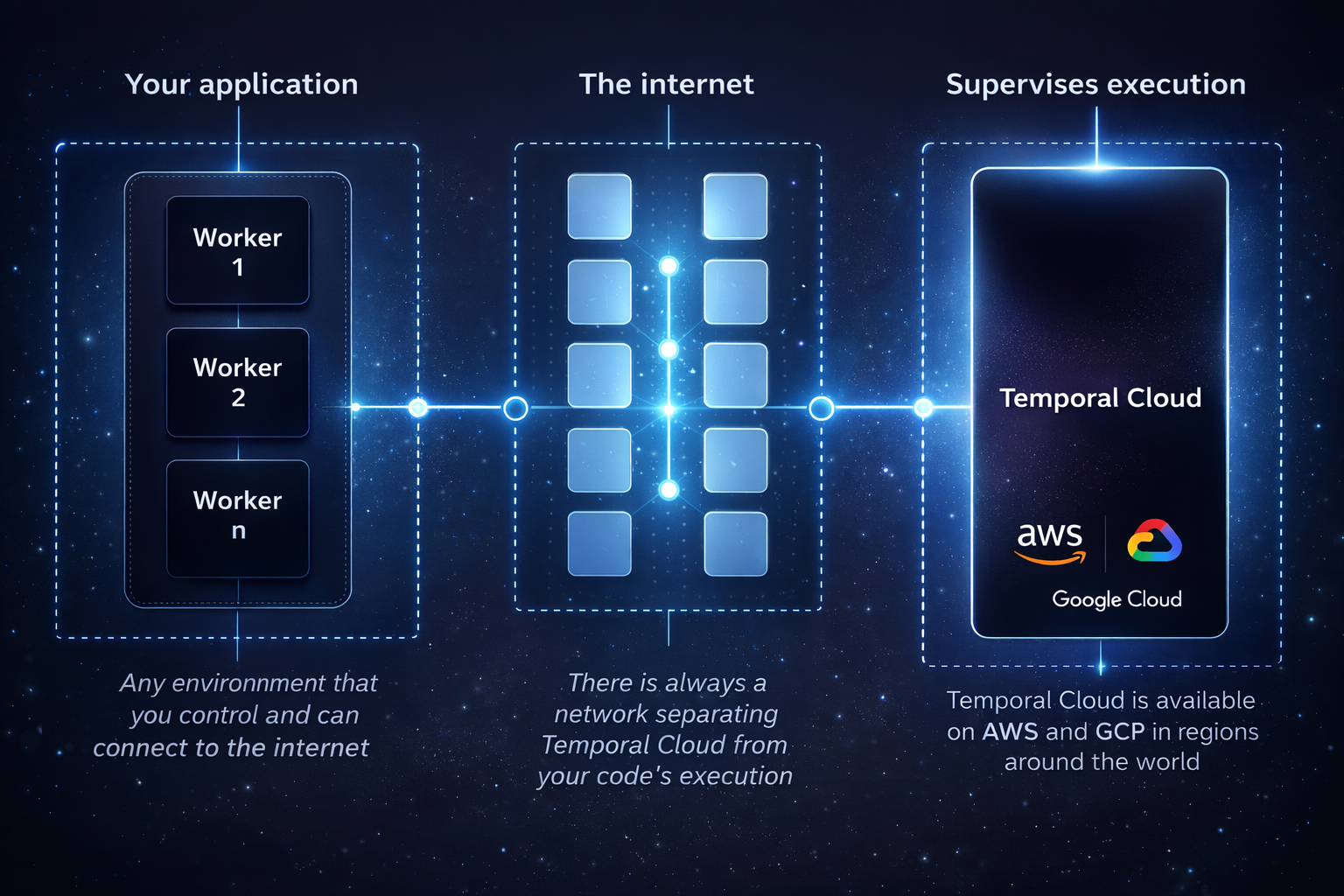
High-level system topology
Temporal Cloud operates as the control plane for your distributed applications:
- Your environment: You run Workers that execute your Workflow and Activity code. These can be deployed anywhere—Kubernetes, VMs, serverless, on-premises.
- Temporal Cloud: Manages Workflow state, Event History, task queuing, and scheduling. All data is encrypted in transit and at rest.
- Temporal SDKs: Your applications use the SDK to communicate with Temporal Cloud over secure gRPC connections.
This separation means Temporal Cloud scales independently of your application. You control compute resources for your Workers; Temporal handles the orchestration layer.
Architecture
Cell-based infrastructure
Temporal Cloud uses a cell-based architecture to achieve isolation and scalability. Each cell is a self-contained deployment unit with its own:
- Dedicated cloud account and VPC
- Kubernetes cluster running Temporal services
- Primary database with synchronous replication across three availability zones
- Elasticsearch for Workflow visibility and search
- Load balancers and ingress management
- Observability and certificate infrastructure
Cells act as failure domains. If infrastructure within a cell experiences issues, only Namespaces in that cell are affected. This design limits blast radius and enables independent scaling.
Data plane and control plane
Data plane: Where your Workflows execute. Each cell processes Workflow operations, persists state, and manages task queues. The data plane is optimized for low latency and high throughput.
Control plane: Manages provisioning, configuration, and lifecycle operations. When you create a Namespace, the control plane:
- Selects an appropriate cell in your chosen region
- Provisions database resources and roles
- Generates and deploys mTLS certificates
- Configures ingress routes and validates connectivity
The control plane uses Temporal itself (durable execution) to orchestrate these operations reliably.
Multi-cloud availability
Temporal Cloud runs on both AWS and GCP:
- 14 AWS regions spanning North America, Europe, Asia Pacific, and South America
- 5 GCP regions in North America, Europe, and Asia Pacific
You can create Namespaces in any supported region. For disaster recovery, you can replicate across regions within a cloud provider or across cloud providers entirely.
See Service regions for the complete list of available regions.
Built-in reliability
Every Temporal Cloud Namespace includes baseline high availability:
- Three-zone replication: Workflow state synchronously replicates across three availability zones before acknowledging writes
- Automatic failover: If one zone becomes unavailable, operations continue on the remaining zones
- 99.9% SLA: Contractual uptime guarantee for standard Namespaces
High Availability features
For workloads requiring stronger guarantees, Temporal Cloud offers three replication options:
| Deployment | Description | Use case |
|---|---|---|
| Same-region | Replicate across isolated cells within one region | Single-region applications needing cell-level isolation |
| Multi-region | Replicate across regions within one cloud provider | Geographic redundancy and compliance requirements |
| Multi-cloud | Replicate across cloud providers (AWS ↔ GCP) | Maximum resilience against provider-level outages |
High Availability Namespaces include:
- 99.99% SLA: Four-nines contractual uptime guarantee
- Sub-1-minute RPO: Recovery Point Objective for data loss
- 20-minute RTO: Recovery Time Objective for failover completion
- Automatic or manual failover: Choose your preferred failover strategy
See High Availability for configuration details.
Security model
Temporal Cloud implements defense-in-depth security:
Your code stays with you
Temporal Cloud never executes your application code. Workers run in your environment, connecting to Temporal Cloud over encrypted channels. You control access to your compute resources and secrets.
Client-side encryption
The Data Converter lets you encrypt payloads before they leave your Workers. Temporal Cloud stores ciphertext—if the service were compromised, your data remains encrypted. Deploy a Codec Server to decrypt data in the Web UI without sharing keys.
Network isolation
- mTLS authentication: Per-Namespace certificate-based authentication for gRPC endpoints
- API key authentication: Alternative to certificates for simpler key management
- Private connectivity: AWS PrivateLink and GCP Private Service Connect for traffic that never traverses the public internet
Compliance
Temporal Technologies maintains SOC 2 Type 2 certification and complies with GDPR and HIPAA regulations. Audit logs capture all API operations and can be exported to your security monitoring systems.
See Security model for complete details.
Consumption-based pricing
Temporal Cloud charges based on what you use:
Actions
The primary billing unit. Actions are billable operations like starting Workflows, sending Signals, recording Heartbeats, and completing Activities. Pricing starts at $50 per million Actions with volume discounts as you scale.
Storage
- Active Storage: Event History for running Workflows
- Retained Storage: Event History for completed Workflows (configurable retention period up to 90 days)
Plans
Four tiers—Essentials, Business, Enterprise, and Mission Critical—with increasing support levels, included Actions/Storage, and features like SAML and SCIM. The Essentials plan starts at $100/month.
Self-serve signup and plan management available at cloud.temporal.io.
See Pricing for detailed rates and examples.
Portability
Temporal Cloud runs the same Temporal Server as the open-source distribution. This means:
Zero code changes
Applications built for self-hosted Temporal work on Temporal Cloud without modification. Update your connection configuration to point at your Cloud Namespace—that's it.
Zero-downtime migration
Automated migration uses Workflow replication to move running Workflows from self-hosted to Cloud (or between Cloud regions) without interruption. No Workflow restarts, no data loss, no downtime.
Manual migration works by updating Clients and Workers to use new Namespace endpoints while existing Workflows complete naturally.
Bidirectional
Move workloads from self-hosted to Cloud, Cloud to self-hosted, or between Cloud regions and providers. The same migration tooling works in any direction.
Self-serve operations
Temporal Cloud is designed for self-service:
- Web UI: Create Namespaces, manage users, configure settings at cloud.temporal.io
- CLI (
tcld): Automate operations from the command line - Terraform provider: Infrastructure-as-code for Namespaces, users, and configuration
- Cloud Ops API: Programmatic access for custom tooling and automation
No support tickets required for standard operations.
Getting started
For existing Temporal users, see Migration to move self-hosted workloads to Cloud.